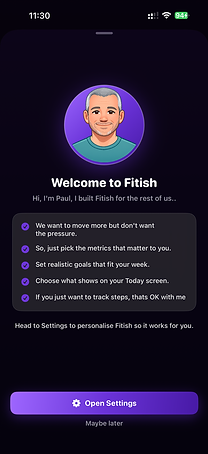


Try my App - Fitish
"Fitish” an informal/slang adjective meaning kind of fit or reasonably fit, but not extremely athletic or in peak condition.
So if someone says: “I’m fitish.”
they usually mean:
-
they exercise sometimes,
-
they’re in okay shape,
-
they’re healthier/fitter than some,
-
but they wouldn’t call themselves fit.
-
But maybe they would like to be a little fitter
This is the App for the Fitish, it builds and grows as you and your fitness do. It starts as a pedometer, just keep your iPhone in your and connect Apple Health and it grows as you do. Want to know how many calories you burned today, add it to your tiles, what to set a target for calories burned, add it to your rings.
What about exercise, well log you walk, run, ski, swim, football in to Apple Fitness and it will update Fitish. Keep your phone in your pocket while you run or walk for more detail. If you get the bug and want even more then a tracker such as a Fitbit, Apple Watch, Garmin and any others that write the data to Apple Health can be used with Fitish.
Want more….Fitish will use AI to suggest some workouts that suit you, your stage of activity, the kit you have available, and the time you have. With a simple layout and clear description you can control the pace that you work, control the development and control the complexity of movement. No gym bro’s, no pressure just help and encouragement.
The idea is simple, I want people of all ages and sizes to move a little more. Fitish can help by displaying and reporting your activity and by offering some gentle encouragement. Fitish is there for you.
FAQ'S
Will there be updates and enhancements?
Yes. I am always open to feedback and want to improve the App wherever possible.
Can I track activities with an Apple Watch?
Yes. Keep your phone in your pocket to tract steps. You a use the Apple Fitness app to log specific activities such as walking, running, tennis and much more. Keep your phone in your pocket for more detailed info.
As you build you activities and interest in moving more then using a tracker such as a Fitbit, Apple Watch, Garmin and so on will provide even more detailed info if you link them to Apple Health.
Can I add activities afterwards?
Yes. Use the Apple Health App. Go to workouts, all workouts and press +
Privacy Policy
Last updated: May 2026
Your privacy matters to us. The Fitish app was designed to help you track and improve your fitness — not to collect, store, or sell your personal information.
What Data This App Uses
This app can connect to Apple HealthKit in order to read and display fitness and health information that you choose to share, such as activity, workouts, steps, calories, heart rate, or related fitness metrics.
Access to HealthKit data is entirely controlled by you through Apple’s permission system. The app only accesses the specific categories you explicitly allow.
Where Your Data Is Stored
All data used by the app remains on your device.
We do not operate servers for storing your health or fitness information, and we do not upload your HealthKit data to any cloud service controlled by us.
Your information is not copied, transferred, or backed up to external databases owned or managed by the developer.
Data Collection
We do not:
-
collect personal health data,
-
track your activity across apps or websites,
-
create advertising profiles,
-
sell user data,
-
share data with third parties,
-
or use analytics tools to monitor your personal fitness information.
In short: your data stays with you.
Apple HealthKit
Any HealthKit information accessed by this app is used solely for providing app functionality and improving your experience within the app.
HealthKit data is never used for advertising, marketing, or data-mining purposes.
The app complies with Apple’s HealthKit privacy requirements and guidelines.
Third-Party Services
This app does not use third-party advertising SDKs or external data brokers.
If future versions introduce optional third-party integrations or cloud features, this privacy policy will be updated accordingly.
Security
Because your data remains stored locally on your own device, security largely depends on your device settings and Apple’s built-in protections, including device encryption, passcodes, Face ID, and iCloud security features you choose to enable.
Your Control
You can revoke HealthKit permissions at any time by going to:
Apple Health App → Profile → Apps → [Your App Name]
You may also uninstall the app at any time to remove its locally stored data.
Contact
If you have questions about this Privacy Policy or how the app handles data, you can contact me through the app’s support page, App Store contact information or using the contact form on this site.